
Perspective to Optix Automated Conversion Tooling
A deterministic converter reads an Ignition Perspective project and builds a native FactoryTalk Optix project: tags, reusable types, screens, to live bindings. Same export in, same project out. Three screens from Inductive's public demo, measured.

Every HMI migration starts from an existing process, and today that HMI is rebuilt by hand, screen by screen. Most of that work is repeatable, and it can be automated.
ASQI built a conversion engine. It reads an Ignition Perspective project and builds a native Optix project from it: the tag model, one reusable type per template, the screens, the links. It is a program, not a prompt. Same export in, same Optix project out, every time, and anything it cannot translate is named in a report rather than guessed at.
Below are three HMI screens, converted and running live in Optix against the same gateway as the originals, with the numbers for each.
Why I built this
The cost of migrating keeps manufacturers from modernizing. I spent years at a systems integrator writing controls and custom .NET SCADA, then led an ME-to-Optix migration at a packaging OEM. This year I also put a 14-site municipal water system live on Perspective. I build on both platforms and teach Optix to OEMs and integrators.
The first real use of the converter was not a migration. It was training. I ran a two-day Optix session for an integrator with an internal Ignition library, converted parts of that library, and put each screen beside its original. Seeing their own templates come across as Optix types and aliases helped them pick up Optix faster than starting from a blank project.
How it works
80% of a port within reach of a plain algorithm, and the output is an ordinary Optix project, opened in Studio, that an Optix developer can maintain.
HMI Projects are exportable into raw formats
Views, bindings, styles, tags and translations are readable files in a gateway export.
Nothing has to be scraped off a screen or reverse-engineered from a runtime. The converter reads the same files a gateway restore would, offline.
Optix Studio has design time scripts
Optix is an object model all the way down, and design-time NetLogic means a small bridge inside Studio can create types, instances, variables and bindings over HTTP.
That is what lets a program build the project the way a developer would, through Studio, rather than by writing project files around it.
Measure first
The coverage report runs locally against the project files in minutes. Every binding is classed as auto-translated, handed to the finishing step, or lost. Against Inductive Automation's whole public demo project, which the three screens below come from:
- 57 application roots, 8,510 components, 3,447 bindings
- 81.1% of bindings translate automatically
- 18.9% go to the finishing step, mostly Python transforms that compute something
- 0 lost
- 18 of the 57 roots convert at 100%
Half of the components map one to one onto an Optix widget, and almost all the rest become a small group of Optix widgets standing in for one Perspective component. Templates are where that pays off: each embedded view becomes one Optix type with aliases, and each embed becomes an instance of it.
The pipeline
- Read. The gateway backup comes in: views, bindings, styles, SVG, tags, translations. Offline.
- Measure. A coverage report per app root, before anyone writes a schedule.
- Plan. Views become a list of Studio operations. Same input, same plan. One reusable template per embedded view, the page at its design size, and every gap named in a ledger.
- Emit. The plan is played into Optix Studio: model variables, types, instances, links. No language model involved.
- Run and verify. The emulator comes up, the screen is pixel-diffed against Ignition at the same size, and the runtime log is scanned. No screen is called done because it looks right.
- Finish. The ledger of named gaps is worked through in Studio: charts, alarms, login, scripts, styles. It touches only items the converter named, and every operation is recorded so the pass replays on the next run.
- Go live. Optix's built-in OPC UA client or another comm driver points the bindings at their sources.
Deterministic Conversions
- Repeatable: Run it twice and you get the same project. Fix a mapping rule and every screen that uses it changes the same way on the next run.
- Reviewable: Every operation is in the plan before Studio is touched, and the model is read back against that plan afterwards.
- Honest about gaps: What it cannot translate is reported by name with the reason. Nothing is silently dropped or approximated without a note.
- Closing the gaps: The finishing step can be done with ftx-mcp, the open-source Studio tool surface I maintain, but the ledger works just as well as a to-do list for a controls engineer. Finishing a conversion does not require a language model at all.
Three Projects
I picked three screens from Inductive Automation's public demo project that have little in common. Each one is shown live, Perspective on the left and the converted Optix project on the right, both reading the same gateway.
Traditional HMI:
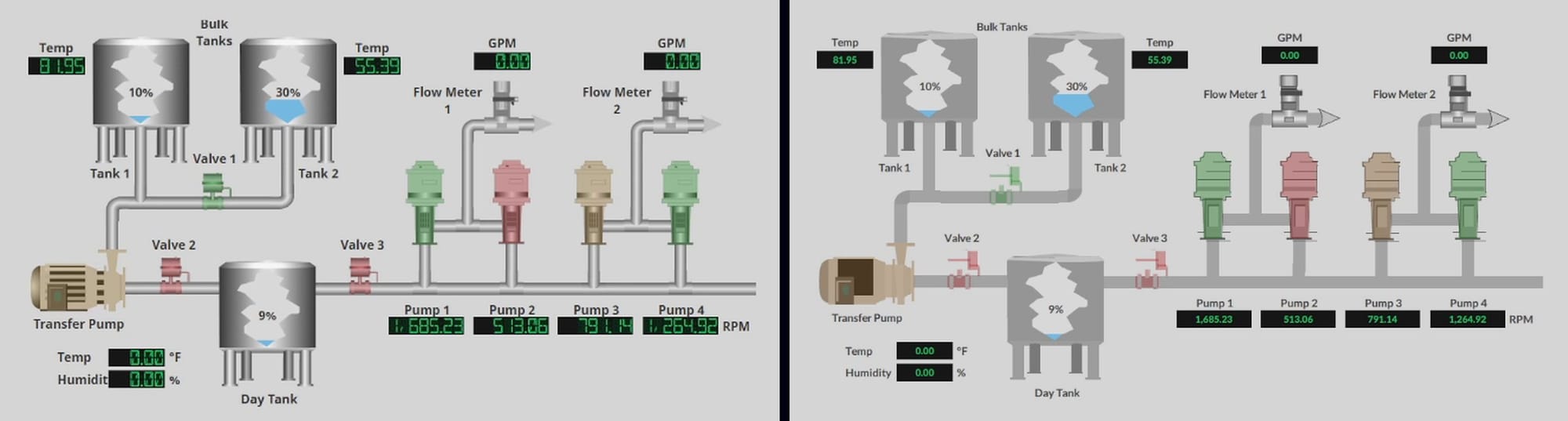
Every pump, valve and tank here binds through a playback-controller structure, and the converter resolves those down to the tags they actually read. 3,497 converter operations in about eight minutes.
The finishing pass (118 operations) gated the mode panel and applied the LED readout skin, tank fill expressions driven by level, and border cleanup. A further finishing pass went past the screen into the Optix domains Perspective expresses differently: native alarms on the pump fault tags, a data logger feeding a trend, and users with a login form.
Oil & Gas Details:
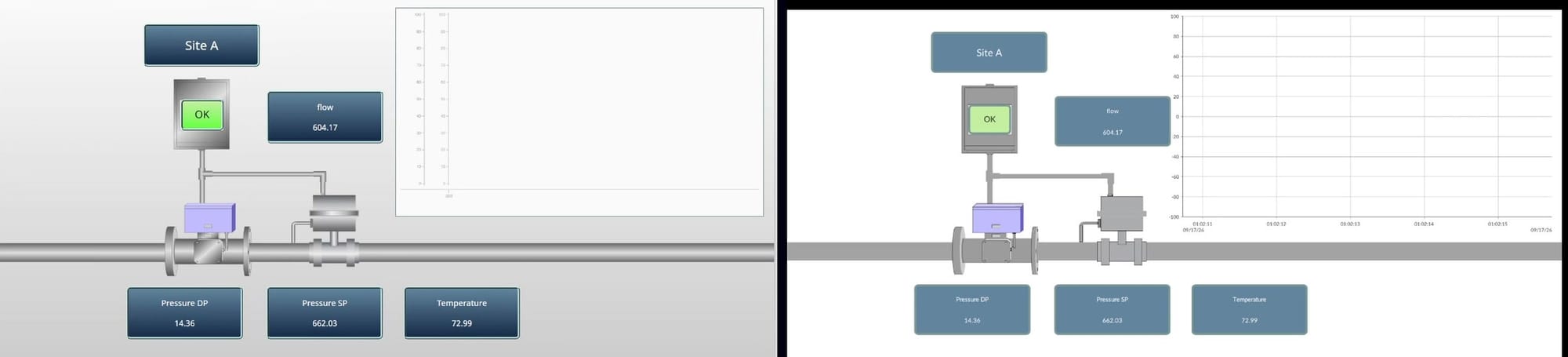
The converter built the pipes, symbols, readouts, tiles and trend: 671 operations, none failed, in about five minutes.
The finishing pass added gradient backplates, the readout skin, the trend axis and a navigation tab in 325 operations. Gradient fills and dashed borders are still a ceiling, and the ledger says so rather than faking them.
Water Overview:
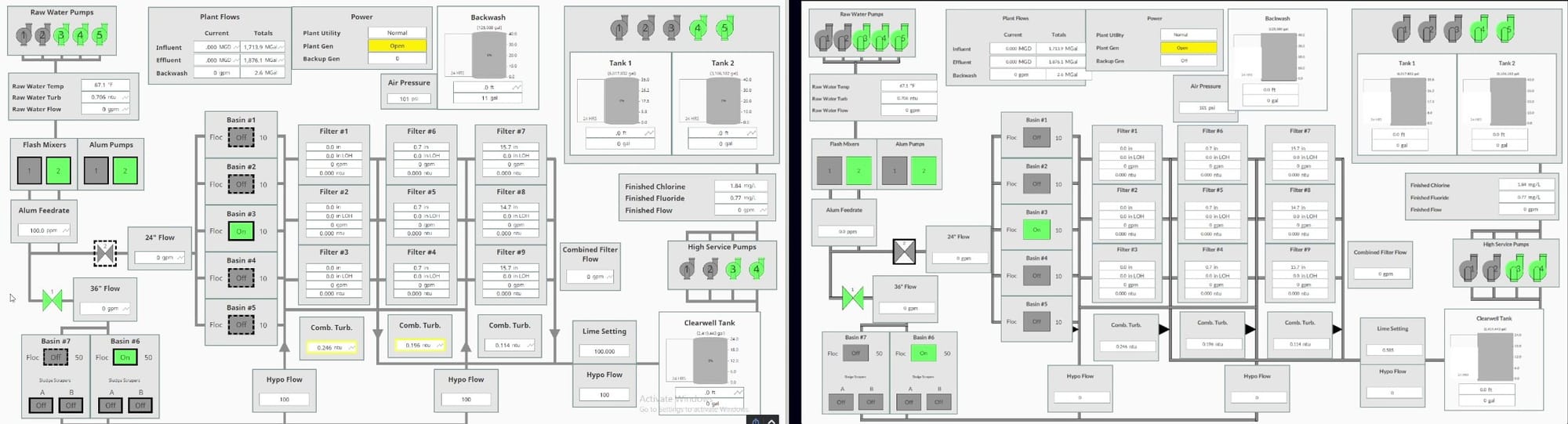
The big one: 5,095 converter operations in about ten minutes, with per-instance, tag-driven state on 55 readouts and 20 symbols.
Each symbol's color chain becomes color states gated on that instance's own tag, and declared defaults are honored exactly, typos included, so the screen reads the way Ignition does. The finishing pass (208 operations) handled tank bodies, tick labels, a valve path, readout alignment, and Ignition's number masks on 68 readouts.
Every operation is classified
The converter does not report success or failure. It reports one of five classes for every operation:
| Class | Meaning |
|---|---|
| Converted | Emitted and verified |
| Converted, styled | Skins and static styles carried across |
| Converted with a note | Closest Optix form, difference recorded |
| Script-fed | Only a provable script output is converted |
| Reported | Named with the reason, never half-built |
That classification is what makes the result reviewable. An engineer can open the ledger and see exactly which judgment calls were made, and where.
What converts, what gets finished, what is only reported
The converter handles on its own
- Coordinate, flex and column layouts
- Labels, buttons, entries, checkboxes, dropdowns, LEDs
- Images, icons and SVG symbols
- Tag, property, expression and map bindings
- Embedded views as templates; static and tag-bound styles
- Set, toggle, popup and change-panel events; translations
- The navigation shell, docks and page routes
- Alarm objects from tag configuration, and the OPC UA link to the gateway
Closed by the finishing step
- Tanks, pumps, valves and symbol state colors
- Gauges and tables; number formats
- One-line provable scripts
- Navigation with route parameters
- History: logger, store and trend
- Gradients and dashed borders
Built in the finishing step
- Charts and trends
- Python script transforms that compute values, and Python event handlers
- The alarm grid and banner
- Users, groups and login forms
Reported, with no Optix counterpart
- Split containers
- Barcode, signature and map components
- Reports and carousels
Beyond Perspective
The reader parses a source project into one intermediate model, and it is the only platform-specific part. The planner and writer (templates, per-instance state, expressions, layout, the ledger) and the verification (read-back against the plan, side-by-side render, runtime log scan) are shared, and they have now been exercised on 8,500 components.
Ignition Vision, Pro-face, FactoryTalk View SE, AVEVA InTouch and Siemens WinCC all have export formats that can covert to Optix. Each new source would start the same way: build the reader, run the coverage report on a real project, and let the number decide whether a conversion is worth scheduling.
What I would like to hear
If you run Optix or are evaluating it: which HMI components would you want converted first, and where have you hit walls in Optix that a tool like this should handle?
If you have a legacy HMI and want to know how it would come across, send me an export and I will send back the coverage report: what converts, what needs a finishing pass, and what has no counterpart, root by root.
If you just want the tooling, ftx-mcp is open source and MIT licensed: the Studio bridge and tool surface used for the finishing pass above. The conversion engine itself runs as an ASQI service.
ASQI builds AI-assisted engineering tooling for industrial automation, and delivers Optix and Ignition projects and training.